One of the first things you learn about Node.js is the Golden Rule: "Node.js is single-threaded."
For 90% of web applications, this is a feature, not a bug. The Event Loop allows Node to handle thousands of concurrent I/O connections (like database queries or API calls) without the overhead of creating threads.
But there is a catch.
Because there is only one thread, if you run a heavy CPU task (like image processing, video compression, or complex implementation of cryptography), you block that single thread. Your entire server freezes. No one else can log in, no APIs respond. The application effectively dies until that calculation finishes.
Enter Worker Threads.
Introduced as a stable feature in Node v12, Worker Threads allow you to break the "Single-Threaded" rule and execute JavaScript in parallel background threads.
The "Chef" Analogy
To understand why we need Workers, let's look at a restaurant kitchen.
- Standard Node.js (The Main Thread): You have one Chef. This Chef is a master multitasker. He takes an order, puts a pizza in the oven, and immediately takes the next order. He doesn't wait for the pizza to bake (Async I/O). This is fast and efficient.
- The Problem (CPU Blocking): Suddenly, a customer orders a "Hand-Carved Ice Sculpture." The Chef has to stop taking orders and spend 20 minutes chiseling ice. The restaurant halts. The pizza in the oven burns. Customers leave.
- The Solution (Worker Threads): You hire a Sous-Chef (a Worker). When the Ice Sculpture order comes in, the Head Chef passes the ticket to the Sous-Chef in the back room. The Head Chef goes back to taking orders instantly, while the Sous-Chef works in parallel.
How Worker Threads Work Under the Hood
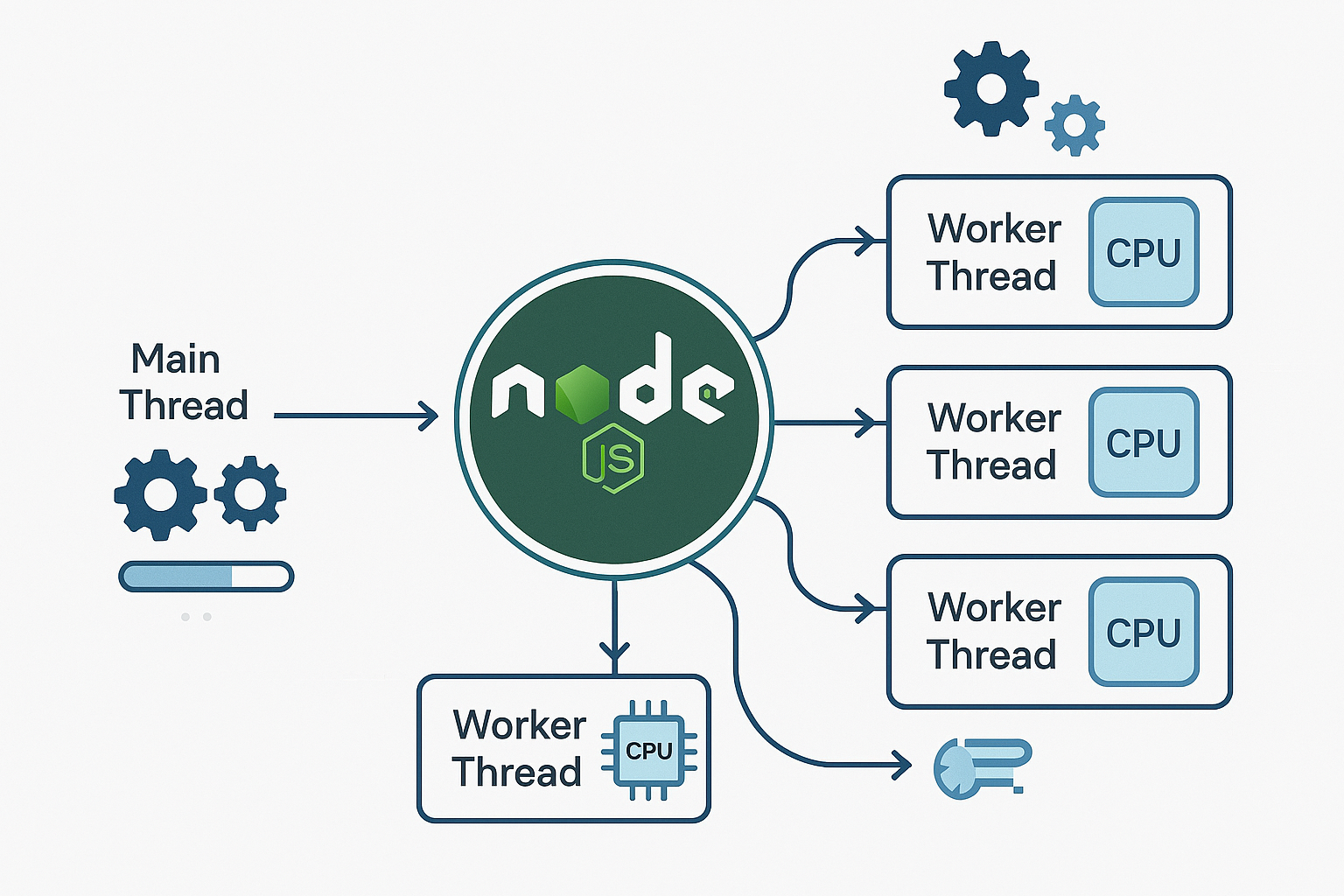
Unlike the cluster module (which spawns entirely new Node.js processes), Worker Threads create new threads within the same process.
Here is the architecture:
1. Isolated V8 Engines
Each Worker Thread gets its own instance of the V8 engine and its own Event Loop. This means:
- Variables are not shared automatically. A global variable in the Main Thread does not exist in the Worker Thread.
- If a Worker crashes, it doesn't necessarily kill the Main Thread.
2. Communication via Messaging
Since scopes are isolated, the Main Thread and the Worker communicate by passing messages back and forth, similar to how a frontend talks to a Web Worker.
- Main: "Here is the data. Start working." (worker.postMessage())
- Worker: "I received it. Processing..." (parentPort.on('message'))
- Worker: "I am done. Here is the result." (parentPort.postMessage())
3. Shared Memory (The Superpower)
This is where Workers shine over Child Processes. Workers can share memory using SharedArrayBuffer. This allows the Main Thread and the Worker to read/write to the same chunk of memory without the expensive cost of serializing data (converting objects to text) to send it back and forth.

A Simple Example
Imagine calculating the Fibonacci sequence for a large number. On the main thread, this would freeze your server. Here is how it looks with a Worker.
// main.js
const { Worker } = require('worker_threads');

function runService(workerData) {
  return new Promise((resolve, reject) => {
    // Spin up a new worker
    const worker = new Worker('./worker.js', { workerData });

    // Listen for the result
    worker.on('message', resolve);
    worker.on('error', reject);
    worker.on('exit', (code) => {
      if (code !== 0) reject(new Error(`Worker stopped with exit code ${code}`));
    });
  });
}

async function run() {
  console.log("Main thread is free to do other things...");
  const result = await runService(40); // Calculate Fib(40)
  console.log("Result from worker:", result);
}

run();
// worker.js
const { workerData, parentPort } = require('worker_threads');

// A CPU-heavy function
function fibonacci(n) {
  if (n < 2) return n;
  return fibonacci(n - 1) + fibonacci(n - 2);
}

// Do the work
const result = fibonacci(workerData);

// Send result back to main thread
parentPort.postMessage(result);
When to Use Workers
It is tempting to throw everything into a Worker Thread to make it "faster," but that often backfires. Creating a Worker is expensive (it has to boot up a V8 instance).
❌ Do NOT use Workers for I/O
Don't use Workers for database queries, HTTP requests, or file reading.
- Why? Node.js already does this efficiently in the background using C++ threads (via libuv). Wrapping an async DB call in a Worker Thread just adds overhead for no gain.
✅ DO use Workers for CPU Tasks
Use Workers when you have to process data synchronously.
- Image Processing: Resizing, cropping, or filtering images (e.g., sharp library).
- Video Compression: Transcoding video files.
- Cryptography: Generating massive RSA keys or hashing thousands of passwords.
- Data Parsing: Parsing a 500MB JSON or CSV file.
Conclusion
Node.js is no longer "just" single-threaded.
While the Event Loop remains the heart of Node.js for handling high-concurrency I/O, Worker Threads give you the muscle to handle heavy computation.
By offloading heavy math and parsing to background threads, you ensure your Main Thread stays where it belongs: handling incoming requests at lightning speed.
References
- https://nodesource.com/blog/worker-threads-nodejs
- https://medium.com/@manikmudholkar831995/worker-threads-multitasking-in-nodejs-6028cdf35e9d
- https://www.scaler.com/topics/nodejs/worker-threads-in-node-js/