

The Hidden Foundation That Powers Every Query You Run
When you write SELECT * FROM Users WHERE Id = 42, you probably think about tables, rows, and indexes.
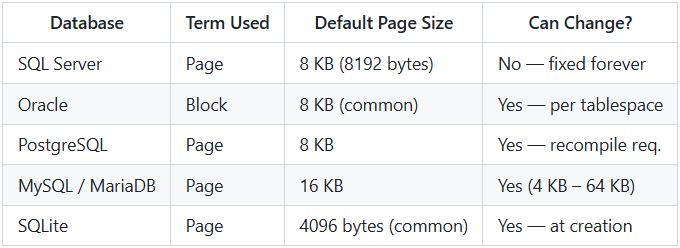
But long before your row reaches the execution engine, the database engine has already performed a crucial step: it read one or more 8 KB (or 16 KB) chunks from disk called pages (or blocks).
These pages are the real physical building blocks of every major relational database. Understanding them is the difference between guessing why a query is slow and knowing exactly why.
What Exactly Is a Page (or Block)?
A page is the smallest unit of data that a database reads from or writes to disk in a single I/O operation.
Think of it like this:
- You ask for one sentence from a book.
- The librarian doesn’t hand you just that sentence.
- She hands you the entire page the sentence lives on.
That’s exactly how databases work.
Anatomy of a Typical Data Page (SQL Server Example)
An 8 KB SQL Server data page looks like this in memory/disk:
+--------------------------------------------------+
| Page Header                  96 bytes           |
+--------------------------------------------------+
| Data Rows                    variable           |
| (actual table records)                           |
+--------------------------------------------------+
| Free Space                   variable           |
+--------------------------------------------------+
| Row Offset Array             2–4 bytes per row  |
| (pointers to start of each row, at end of page) |
+--------------------------------------------------+
Total = exactly 8192 bytes
The 96-byte header contains:
- Page number (Page PID)
- Previous/next page pointers (for heap or clustered index)
- Page type (data, index, LOB, IAM, etc.)
- Free space available
- Checksum (if enabled)
- LSN (Log Sequence Number)
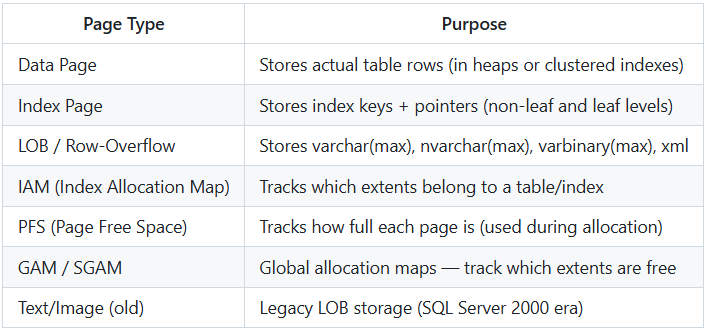
Different Types of Pages
Not all pages store regular table rows.
Why Page Size Directly Affects Your Database Design
-
Maximum Row Size
SQL Server: ~8,060 bytes per row
→ Because a row must fit on a single data page (minus header and offset array).
→ Anything larger → automatically moved to LOB/row-overflow pages.
-
Wide Tables Force More Pages → More I/O
A table with 10-byte rows can store ~800 rows per page.
A table with 7,000-byte rows stores only 1 row per page → 800× more I/O.
-
Index Depth
Smaller page size = more levels in B-tree = slower seeks.
That’s one reason MySQL InnoDB moved from 8 KB → 16 KB default.
The Dreaded Page Split
Imagine a page that is 98% full. You insert or update a row that no longer fits.
What happens?
- Database allocates a brand-new page.
- Roughly half the rows move to the new page.
- Both pages are now ~50% full.
- Physical order on disk may now be fragmented.
Result:
- Wasted space (internal fragmentation)
- Slower range scans (external fragmentation)
- Heavy write amplification
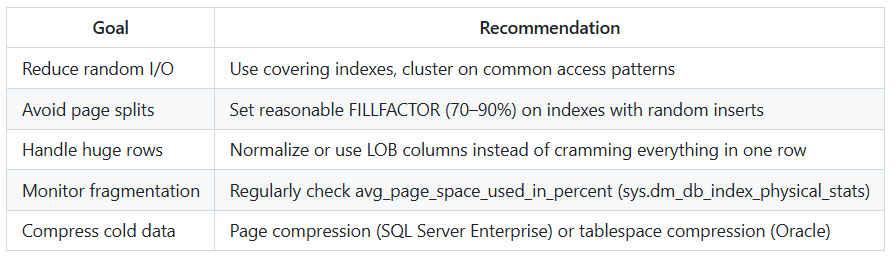
This is why DBAs obsess over fillfactor and rebuild/reorganize indexes.
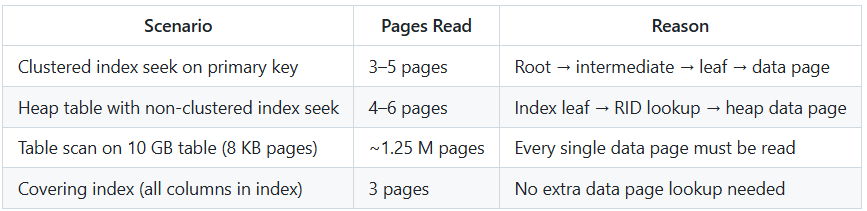
Real-World Performance Examples
How to See Pages in Action
SQL Server
-- See what is actually on a page (undocumented but safe)
DBCC TRACEON(3604);                    -- redirect output to SSMS
DBCC PAGE ('YourDatabase', 1, 12345, 3); -- file 1, page 12345, style 3
PostgreSQL
-- Install and use pageinspect extension
CREATE EXTENSION pageinspect;
SELECT * FROM page_header(get_raw_page('users', 0));
Oracle
-- Dump a block
ALTER SYSTEM DUMP DATAFILE 4 BLOCK 42;
MySQL InnoDB
-- Use innodb_ruby or Percona’s tools
innodb_space -f data/ibdata1 page-dump 100
Best Practice Checklist Based on Page Knowledge