
When working with relational databases, your data is often split across multiple tables. To extract meaningful insights, you need a way to combine this data efficiently.
That’s where SQL joins come in—they allow you to merge rows from two or more tables based on related columns. Mastering joins is essential for writing clean, powerful queries and building scalable applications.
In this guide, we’ll walk through the most common SQL join types, explain when to use each one, and provide clear examples.
Example Tables
Employees Table
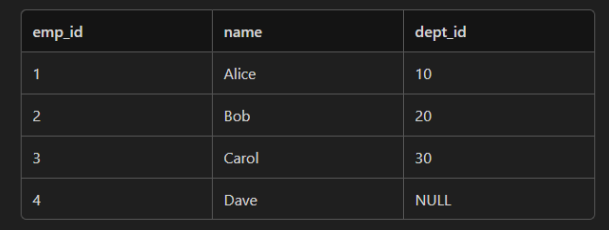
Departments Table
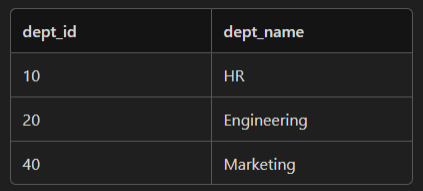
1. INNER JOIN
Definition: Returns only the rows that have matching values in both tables.
Use Case: When you want only the records that exist on both tables.
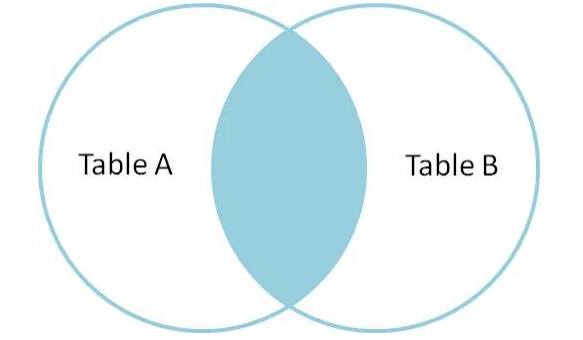
Syntax: INNER JOIN
SELECT *
FROM Employees e
INNER JOIN Departments d ON e.dept_id = d.dept_id;
=> Result:

2. LEFT JOIN (or LEFT OUTER JOIN)
Definition: Returns all rows from the left table, and the matched rows from the right table. If no match, NULL are returned for right table columns.
Use Case: When you want all records from the left table, regardless of whether there's a match on the right table.
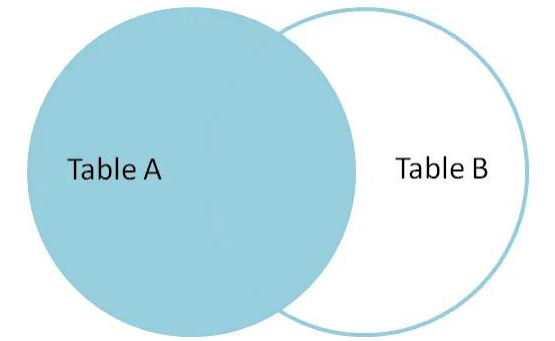
Syntax: LEFT JOIN
SELECT *
FROM Employees e
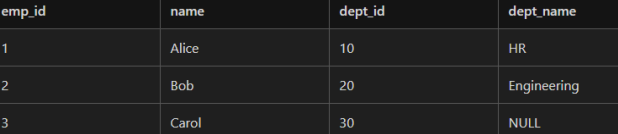
LEFT JOIN Departments d ON e.dept_id = d.dept_id;
=> Result
3. RIGHT JOIN (or RIGHT OUTER JOIN)
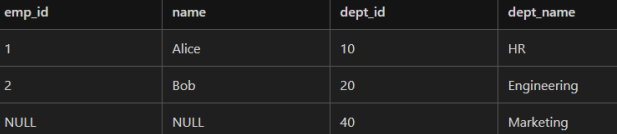
Definition: Returns all rows from the right table, and the matched rows from the left table. If no match, NULLs are returned for left table columns.
Use Case: When you want all records from the right table, regardless of whether there's a match in the left table.

Syntax: RIGHT JOIN
SELECT *
FROM Employees e
RIGHT JOIN Departments d ON e.dept_id = d.dept_id;
=> Result:
4. FULL JOIN (or FULL OUTER JOIN)
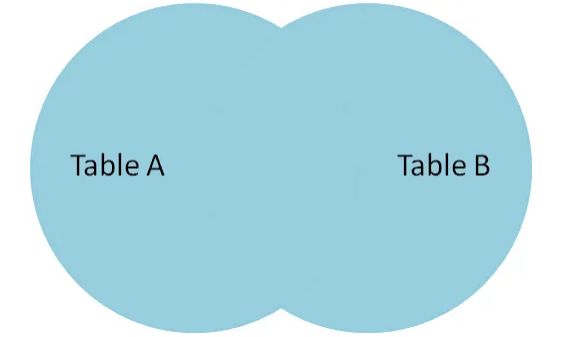
Definition: Returns all rows when there is a match on one of the tables. If there is no match, NULLs are returned for the missing side.
Use Case: When you want all records from both tables, matched or unmatched.
Syntax: FULL OUTER JOIN
SELECT *
FROM Employees e
FULL OUTER JOIN Departments d ON e.dept_id = d.dept_id;
=> Result:

5. CROSS JOIN
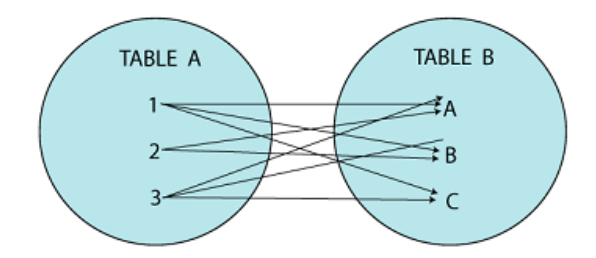
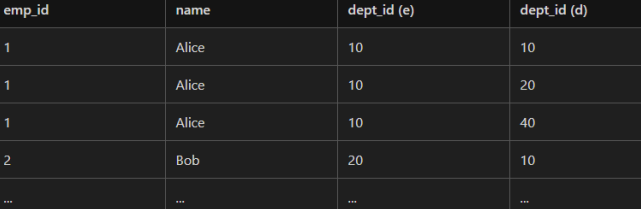
Definition: Returns the Cartesian product of both tables. Every row from the first table is combined with every row from the second table.
Use Case: When you need all possible combinations of rows from two tables.
Syntax: CROSS JOIN
SELECT *
FROM Employees e
CROSS JOIN Departments d;
=> Result (Cartesian product):
6. SELF JOIN
Definition: A regular join but the table is joined with itself.
Use Case: Useful for hierarchical data like organizational charts.
Syntax:
SELECT e1.name AS Employee, e2.name AS Manager
FROM Employees e1
JOIN Employees e2 ON e1.dept_id = e2.dept_id
WHERE e1.emp_id != e2.emp_id;
=> Result:

Summary
- INNER JOIN → Only matching rows.
- LEFT JOIN → All from left + matches from right.
- RIGHT JOIN → All from right + matches from left.
- FULL JOIN → All rows from both tables.
- CROSS JOIN → All possible combinations.
- SELF JOIN → Table joined with itself.