
If you’ve ever written a Node.js application that mysteriously slows down after a few days, or crashes with the dreaded FATAL ERROR: Ineffective mark-compacts near heap limit Allocation failed, you have met the Garbage Collector (GC).
In languages like C or C++, managing memory is a manual chore (malloc and free). In Node.js, we have the luxury of automatic memory management. But "automatic" doesn't mean "magic."
To write high-performance, scalable Node.js services, you need to understand how the underlying V8 engine cleans up your mess.
The Engine: V8
Node.js runs on the V8 JavaScript Engine (the same one inside Google Chrome). V8 uses a "Generational Garbage Collector."
Why "Generational"? Because V8 operates on a simple, empirically proven theory: "The Generational Hypothesis."
Most new objects die young, and those that survive for a while tend to live forever.
Based on this, V8 divides its memory heap into two main distinct sections: the New Space and the Old Space.
1. The New Space (The Nursery)
When you write const user = { name: 'Alice' }, this object is allocated in the New Space. This area is small (usually between 1MB and 8MB).
Because most objects are temporary (like variables inside a function that finishes running), the New Space fills up quickly. When it does, V8 runs a Minor GC (also called "Scavenge").
How Scavenge Works:
- V8 checks the objects in the New Space.
- It identifies which ones are still "alive" (referenced by your code).
- It moves the survivors into a separate area.
- Everything else is discarded.
- Speed: This process is incredibly fast. It happens frequently and usually doesn't cause noticeable lag.
If an object survives two rounds of Scavenging, V8 decides it’s a "long-term resident" and promotes it to the Old Space.
2. The Old Space (The Archive)
This is where your long-lived data resides (like global caches, database connections, or session data). The Old Space is much larger.
Because this space is big, V8 doesn't want to clean it often. Scanning a massive heap takes time. But eventually, it fills up. When it does, V8 runs a Major GC.
The Algorithm: Mark-Sweep-Compact
This is a heavier operation involving three steps:
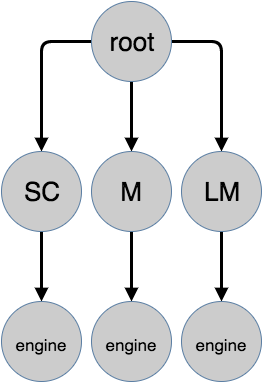
- Marking: V8 starts at the "Root" (the global object) and traverses every single reference. If an object can be reached, it is marked "alive." If it can't be reached (like a variable in a function that has returned), it is unreachable "dead" weight.
- Sweeping: V8 scans the memory and adds the address of the dead objects to a "free list," making that space available for new data.
- Compacting: Over time, memory gets fragmented (like swiss cheese). V8 moves objects closer together to create contiguous blocks of free memory.
The Cost: "Stop-The-World"
Here is the catch.
While the Minor GC is fast, the Major GC is heavy. Traditionally, when a Major GC ran, V8 had to pause your entire JavaScript execution. This is known as "Stop-The-World."
If your heap is massive (e.g., 1.5GB), a Major GC pause could freeze your server for hundreds of milliseconds or even seconds. In a high-throughput API, a 500ms pause is a disaster.
Note: Modern V8 (Orinoco project) has heavily optimized this by doing much of the marking and sweeping in parallel background threads, drastically reducing—but not strictly eliminating—main thread pauses.
Common Memory Leaks (How to Break the GC)
The Garbage Collector can only remove objects that are unreachable. If you accidentally leave a reference to an object you no longer need, the GC cannot clean it up.
Here are the top 3 ways developers accidentally create memory leaks:
1. Global Variasbles
// BAD
global.userCache = {};

function addToCache(id, data) {
    // This grows forever and never gets GC'd
    global.userCache[id] = data;
}
Fix: Use an LRU (Least Recently Used) Cache or Redis with TTL (Time To Live).
2. Forgotten Closures
If a function returns an inner function that references a large variable in the outer scope, that large variable stays in memory as long as the inner function is alive.
3. Uncleared Intervals/Listeners
function connect() {
    const hugeData = new Array(1000000);

    // Even if you stop using 'connect', this interval keeps running
    // and keeps 'hugeData' alive in the closure!
    setInterval(() => {
        console.log(hugeData.length);
    }, 1000);
}
Fix: Always use clearInterval and removeListener when you are done with a process.
Summary
To optimize your Node.js application, you don't need to manage memory manually, but you must respect how V8 works.
- Variable Lifespan: Keep variables scoped as locally as possible so they die young (in the New Space) and are cleaned up cheaply.
- Monitor Heap: Use tools like process.memoryUsage() or Chrome DevTools to watch your Old Space usage.
- Avoid Global State: Global variables are the enemy of Garbage Collection.
Understanding the GC transforms you from a developer who restarts the server when it gets "slow" to a developer who writes resilient, long-running systems.
References
- https://blog.risingstack.com/node-js-at-scale-node-js-garbage-collection/
- https://blog.gceasy.io/how-to-analyze-node-js-garbage-collection-traces/
- https://dev.to/arunangshu_das/7-common-garbage-collection-issues-in-nodejs-jm1